Getting started
What is TilBridge?
A web TMS for language service providers, with AI actions and people side by side on every job of a project, a full CAT editor and support for your clients' file exchanges.
TilBridge brings translation management and computer-assisted translation (CAT) into one web application. Project managers run a project from one page, where every job shows its AI action and the person assigned to it side by side. Linguists work on the text in the CAT editor.
Available capabilities depend on your organization’s configuration, your access and the services it has enabled.
Who it is for
- Project managers set up projects, run AI actions on jobs, assign linguists, set deadlines and follow each job to completion.
- Linguists translate, edit and confirm segments in the editor, using translation memory, terminology and quality findings.
- Administrators manage people, service types, AI and machine-translation integrations and other organization settings.
These are descriptions of work, not a complete permission matrix. Your organization determines what you can access and which work is assigned to you.
The project page
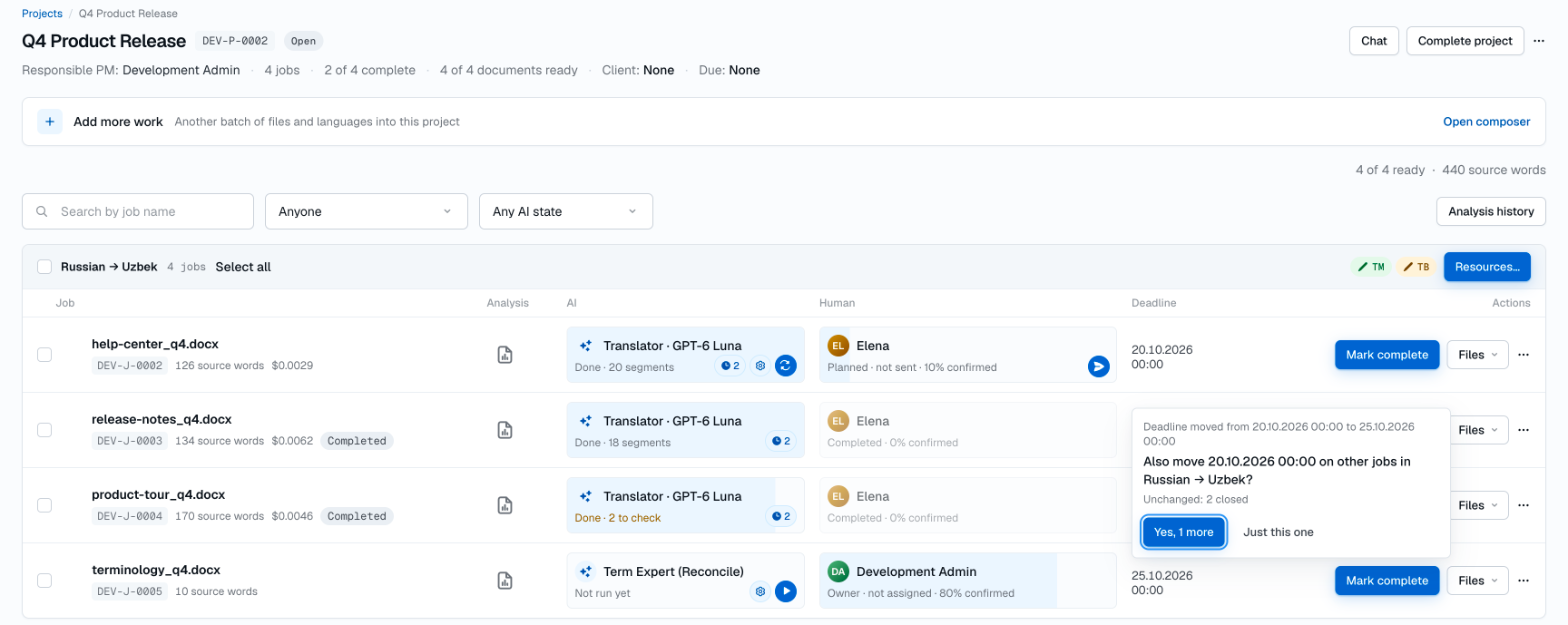
A project groups its jobs by language pair, one row per job.
- AI cell. Choose the job’s AI action — Pre-translate, Translator, Term Expert in Extract or Reconcile mode, or Reviewer (Terminology check) — then start it, stop it or run it again. The cell shows the run’s state, such as Not run yet, Running, Done or Done · 2 to check, and the job shows the provider cost recorded for its AI runs. Pre-translate fills segments from translation memory and machine translation through its own dialog.
- Human cell. Assign a person to the job’s translation service, send the work when it is ready, recall it if plans change, and accept it once the person submits it. The cell shows the state, such as Planned · not sent, Sent, Awaiting acceptance or Completed, and the share of segments confirmed.
- Offers to repeat a change. When you start an AI action, set or move a deadline, or assign a person on one job, the page can offer to make the same change on the other jobs in that language pair: Yes, N more or Just this one. It counts only the jobs the change applies to; completed jobs, for example, stay unchanged.
- Job and project actions. Mark jobs complete; download translations, originals, bilingual Word or XLIFF files from Files; check the analysis history; choose the pair’s translation memories, termbases and machine translation under Resources…; add more files and languages; and ask about a job or the whole project in Chat. A project can be completed once none of its jobs remain open.
The editor
In the CAT editor, a document is presented as segments: source text paired with its translation, with inline tags kept as tags. Linguists translate, edit and Confirm segments. The side panel shows translation-memory matches and terminology, concordance search, quality findings, comments and Changes: each segment’s revisions, including who or which AI action changed what.
Language resources
- Translation memory (TM) provides matches from stored source-and-target pairs so previous translations can inform new work.
- Term bases (TB) hold terminology to keep word choices consistent. Proposed terms wait for a person’s approval; Translator uses approved terms only.
- Machine translation (MT) provides suggestions through configured engines.
- Quality assurance (QA) produces findings for review, such as issues involving tags or numbers. Automated checks support review; they do not establish that a translation is correct or ready to deliver.
Resource availability depends on configuration and access. A suggested match or machine-generated translation still needs to be assessed in context.
Client files and Trados packages
TilBridge works with the files your clients send, including Office documents and bilingual files such as SDLXLIFF, memoQ MQXLIFF, Phrase MXLIFF and XLIFF 1.2. It supports the Trados Studio package lifecycle: import a client’s project package and deliver a return package to them.
AI and human review
AI actions run on jobs through the AI and machine-translation providers enabled for your organization. Their output is a draft for people to work with, not a quality guarantee: segments written by an AI action stay unconfirmed until a person confirms them in the editor, and confirming records the segment as human-reviewed. Term Expert proposals become terminology only when a person approves them. Reviewer (Terminology check) corrects the use of approved terms; its corrections become drafts that a person confirms, and it saves nothing to translation memory.
Where an external AI or translation service is used, project content may be sent to that service to carry out the requested work. Review the project-data handling overview before using sensitive material.
Human judgment remains essential: check meaning, terminology and context, and decide whether the result meets the requirements of the assignment.
Before you start
A 30-minute demo is the starting point: we show TilBridge and discuss your projects, languages and providers. Before any real project material is uploaded for an evaluation, agree with us which capabilities and providers will be enabled and settle your data-handling arrangements.
- Read the security overview for access and protection information.
- Review project-data handling for storage, external services and retention considerations.
- Use DPA enquiries for processing-agreement discussions.
- Follow the release notes for published product updates.
Use the language switch in the header to read available translations. More task-based guides will be added as their instructions are verified against the app.